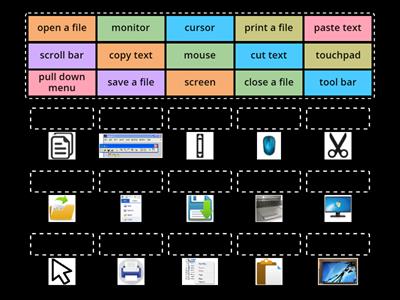
GUI, Graphical User Interface - the visual face of a computer that lets the user interact with buttons and icons instead of typing commands, File Explorer, The Windows filing system, Multitasking, The ability to do many things at once, Start Menu, The main button on the taskbar - A quick access to commonly used files and apps, Taskbar, A strip of icons that lets the user see what is open and access favourite apps, Operating System, The core software that manages a computer's hardware and apps so they can work together, Windows, Microsoft's operating system, iOS, Apple's mobile operating system, Chrome OS, Google's desktop operating system, Linux, A community-driven operating system, Mac OS, Apple's desktop operating system, Android, Google's mobile operating system
0%
The Software
Share
Share
by
Cmcgrath830
KS3
KS4
Computing
Computer Systems
I-edit ang Content
Save
Like
I-Print kini
Embed
Uban pa
Assignments
Leaderboard
Show more
Show less
Kini nga leaderboard naka-pribado. Pag-klik sa
Share
aron himuon kini nga publiko.
Kini nga leaderboard gi-disable sa tag-iya sa resource.
Kini nga leaderboard gi-disable tungod ang imong mga kapilian lahi ra sa tag-iya sa resource.
I-revert ang mga Kapilian
Ang
Matching pairs
usa ka open-ended nga template. Dili kini makamugna ug mga marka sa leaderboard.
Kinahanglan mag log in
Visual style
Fonts
Subscription required
Mga Option
More like this
Activity -Parts of computer
by
Enaskiddees
Open the box
4
Label the Operating System
by
Sekarachari64
Labelled diagram
17
Match the Software - Microsoft Applications
by
Abevan1
Group sort
17
Quiz Windows - File Management (advanced)
by
Carola79
Quiz
7
Computers - vocabulary
by
Vitova
Pagdaug o pildi nga quiz
4
Computer - vocabulary
by
Zsombor24
Match up
4
The Computer screen, components and commands
by
Zavamaconsultin
Match up
8
Whiz: Parts of the Computer
by
Aamir343
Match up
6
I-switch ang template
Ipakita tanan
Open results
Copy link
QR code
Mag-delete
I-restore ang gi-autosave:
?