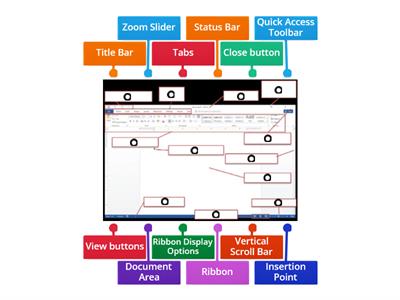
Word processing is the creation, editing, storage, and printing of a document using a word processor., TRUE, FALSE, A word processor is a computer application designed for manipulating text., FALSE, TRUE, The Ribbon contains all the commands you can use to work on a Word document., FALSE, TRUE, The Quick Access Toolbar cannot be customized., FALSE, TRUE, The Title Bar is located at the top of the program window., FALSE, TRUE, The Scroll Bars help you view parts of the document beyond what the window displays., TRUE, FALSE, The Zoom Slider changes the zooming level of the document., TRUE, FALSE, The Word Count indicator shows the current page number., TRUE, FALSE, You can add commands to the Quick Access Toolbar., FALSE, TRUE, You can remove a command from the Quick Access Toolbar by right-clicking it and choosing Remove from Quick Access Toolbar., TRUE, FALSE, What is word processing?, Playing computer games, Browsing the internet, Creating, editing, storing, and printing documents, Creating pictures, What computer application is designed for manipulating text?, Media player, Web browser, Calculator, Word processor, Which part of the Word window contains all the commands used to work on a document?, Zoom Slider, Scroll Bar, Ribbon, Title Bar, Which feature displays the Save, Undo, and Redo buttons?, Ribbon, Title Bar, Quick Access Toolbar, Navigation Pane, What feature helps you go to a particular spot in a document using headings, page thumbnails, or search results?, Scroll Bar, Zoom Slider, Navigation Pane, Ruler, What does the Zoom Slider do?, Opens the Navigation Pane, Counts the words, Saves the document, Changes the zooming level, Where is the Title Bar located?, On the left side, At the bottom of the window, At the top of the program window, Inside the document, What do the Scroll Bars help you do?, Add commands, Change the font, Count words, Scroll vertically or horizontally through a document, Which option can you select to add commands through the Quick Access Toolbar settings?, Page Number, Word Count, Auto-hide Ribbon, More Commands, What should you click to remove a command from the Quick Access Toolbar?, Show Tab and Commands, Add to Quick Access Toolbar, More Commands, Remove from Quick Access Toolbar, Which Microsoft Word feature displays the name of the active document?, Status Bar, Scroll Bar, Ribbon, Title Bar, Which Microsoft Word feature contains all the commands you can use to work on a document?, Quick Access Toolbar, Ribbon, Title Bar, Zoom Slider, Which Microsoft Word feature displays the Save, Undo, and Redo buttons?, Ribbon, Navigation Pane, Quick Access Toolbar, Status Bar, Which Microsoft Word feature changes the zoom level for viewing the document?, Zoom Slider, Title Bar, Ruler, Word Count, Which Microsoft Word feature shows the number of words in the document?, Word Count, Page View, Navigation Pane, Status Bar
0%
computer 4
Del
Del
af
Iamrecaroque
Rediger indhold
Gem
Synes om
Trykke
Integrere
Mere
Tildelinger
Rangliste
Vis mere
Vis mindre
Denne rangliste er i øjeblikket privat. Klik på
Del
for at gøre det offentligt.
Denne rangliste er deaktiveret af ressourceejeren.
Denne rangliste er deaktiveret, da dine muligheder er forskellige fra ressourceejerens.
Indstillinger for gendannelse
Quiz
er en åben skabelon. Det genererer ikke resultater for en rangliste.
Log ind påkrævet
Visuel stil
Skrifttyper
Kræver abonnement
Indstillinger
Mere sådan her
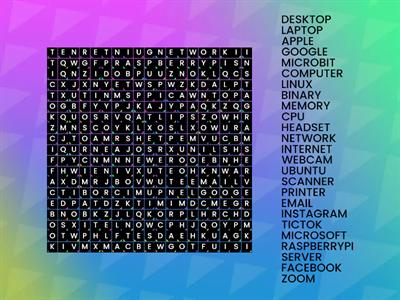
Computer Word Search
af
Sneekylinuxa1
Ordsøgning
4
8.4 Review Drag a Word
af
Gretchen10
Gruppesortering
21
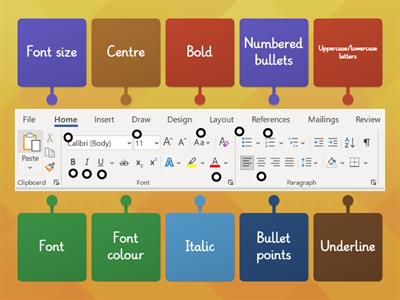
Microsoft Word toolbar
af
Fltutor
Etiket-diagram
33
Quiz Basic Microsoft Word
af
G05325628
Quiz
14
Microsoft Word Window Review
af
U71034113
Etiket-diagram
10
Questions WORDS KB 4
af
Altigrinova
Match op
7
Name the Tool Bar - Word Processing
af
Oliviawhite3
Etiket-diagram
7
Word Processing Commands
af
Mrsreilly
Etiket-diagram
62
AI-forstærket: Denne aktivitet indeholder indhold genereret af AI.
Lær mere.
Skift skabelon
Vis alle
Åbne resultater
Kopiér link
QR-kode
Slette
Gendan automatisk gemt:
?