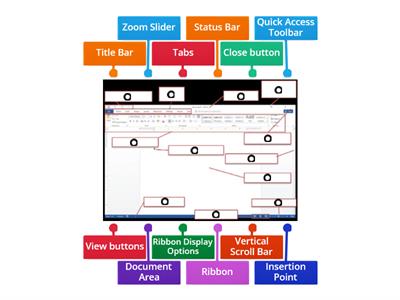
Word processing is the creation, editing, storage, and printing of a document using a word processor., TRUE, FALSE, A word processor is a computer application designed for manipulating text., FALSE, TRUE, The Ribbon contains all the commands you can use to work on a Word document., FALSE, TRUE, The Quick Access Toolbar cannot be customized., FALSE, TRUE, The Title Bar is located at the top of the program window., FALSE, TRUE, The Scroll Bars help you view parts of the document beyond what the window displays., TRUE, FALSE, The Zoom Slider changes the zooming level of the document., TRUE, FALSE, The Word Count indicator shows the current page number., TRUE, FALSE, You can add commands to the Quick Access Toolbar., FALSE, TRUE, You can remove a command from the Quick Access Toolbar by right-clicking it and choosing Remove from Quick Access Toolbar., TRUE, FALSE, What is word processing?, Playing computer games, Browsing the internet, Creating, editing, storing, and printing documents, Creating pictures, What computer application is designed for manipulating text?, Media player, Web browser, Calculator, Word processor, Which part of the Word window contains all the commands used to work on a document?, Zoom Slider, Scroll Bar, Ribbon, Title Bar, Which feature displays the Save, Undo, and Redo buttons?, Ribbon, Title Bar, Quick Access Toolbar, Navigation Pane, What feature helps you go to a particular spot in a document using headings, page thumbnails, or search results?, Scroll Bar, Zoom Slider, Navigation Pane, Ruler, What does the Zoom Slider do?, Opens the Navigation Pane, Counts the words, Saves the document, Changes the zooming level, Where is the Title Bar located?, On the left side, At the bottom of the window, At the top of the program window, Inside the document, What do the Scroll Bars help you do?, Add commands, Change the font, Count words, Scroll vertically or horizontally through a document, Which option can you select to add commands through the Quick Access Toolbar settings?, Page Number, Word Count, Auto-hide Ribbon, More Commands, What should you click to remove a command from the Quick Access Toolbar?, Show Tab and Commands, Add to Quick Access Toolbar, More Commands, Remove from Quick Access Toolbar, Which Microsoft Word feature displays the name of the active document?, Status Bar, Scroll Bar, Ribbon, Title Bar, Which Microsoft Word feature contains all the commands you can use to work on a document?, Quick Access Toolbar, Ribbon, Title Bar, Zoom Slider, Which Microsoft Word feature displays the Save, Undo, and Redo buttons?, Ribbon, Navigation Pane, Quick Access Toolbar, Status Bar, Which Microsoft Word feature changes the zoom level for viewing the document?, Zoom Slider, Title Bar, Ruler, Word Count, Which Microsoft Word feature shows the number of words in the document?, Word Count, Page View, Navigation Pane, Status Bar
0%
computer 4
Jaa
Jaa
tekijä
Iamrecaroque
Muokkaa sisältöä
Tallenna
Tykkää
Tulosta
Upota
Lisää
Tehtäviä
Tulostaulu
Näytä enemmän
Näytä vähemmän
Tämä tulostaulu on tällä hetkellä yksityinen. Jos haluat tehdä siitä julkisen, valitse
Jaa
.
Tehtävän omistaja on poistanut tämän tulostaulun käytöstä.
Tämä tulostaulu on poistettu käytöstä, koska vaihtoehdot eroavat tehtävän omistajan vaihtoehtoista.
Palauta Optiot
Monivalinta
on avoin malli. Se ei luo tulostaululle pisteitä.
SIsäänkirjautuminen vaaditaan
Visuaalinen tyyli
Fontit
Tilaus vaaditaan
Vaihtoehdot
Enemmän näin
Computer Word Search
tekijä
Sneekylinuxa1
Piilosana
4
8.4 Review Drag a Word
tekijä
Gretchen10
Ryhmittelypeli
21
Microsoft Word toolbar
tekijä
Fltutor
Nimeä kuvaan
33
Quiz Basic Microsoft Word
tekijä
G05325628
Monivalinta
14
Microsoft Word Window Review
tekijä
U71034113
Nimeä kuvaan
10
Questions WORDS KB 4
tekijä
Altigrinova
Yhdistä parit
7
Name the Tool Bar - Word Processing
tekijä
Oliviawhite3
Nimeä kuvaan
7
Word Processing Commands
tekijä
Mrsreilly
Nimeä kuvaan
62
Tekoälyn parannettu: Tämä toiminta sisältää tekoälyn tuottamaa sisältöä.
Opi lisää.
Vaihda mallia
Näytä kaikki
Avoimet tulokset
Kopioi linkki
QR-koodi
Poista
Säilytetäänkö automaattisesti tallennettu tehtävä
?