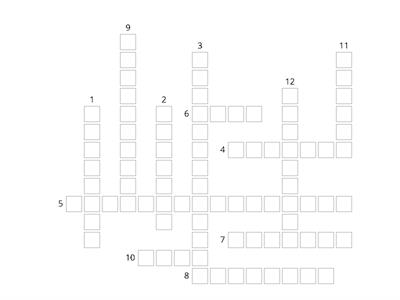
This profile / account on the app allows you to remove a user and their associated projects. (1 word), Admin, If you have trouble scanning the QR code, then you can use this. (2 words), Alternative Method, On this page you can see which devices download and sync on the Mobile App for your project. You can also create names for each device. (1 word), Dashboard, These are data exports sent from the mobile app for this project. (3 words), Emergency Data Dump, This help button is found in the app in the user profile and answers any queries you may have about the app. (3 words), Frequently Asked Questions, This is where you go to download the Android version. (2 words), Google Play, You click this button if you want to increase or decrease the font size in a record on the app. (2 words), Instrument Controls, This is where you can view your device’s UUID. (2 words), Project Admin, This is what you used to set up / link your server (online) project on your Mobile App. (2 words), QR Code, This is where you to go on the server/online project so a user in your project is able to access the REDCap Mobile App. (2 words), User Rights
0%
Game 4
共有
共有
Digitaldataserv
さんの投稿です
コンテンツの編集
セーブ
いいね!
印刷
埋め込み
もっと見る
割り当て
リーダーボード
もっと表示する
表示を少なくする
このリーダーボードは現在非公開です。公開するには
共有
をクリックしてください。
このリーダーボードは、リソースの所有者によって無効にされています。
このリーダーボードは、あなたのオプションがリソースオーナーと異なるため、無効になっています。
オプションを元に戻す
フラッシュカード
は自由形式のテンプレートです。リーダーボード用のスコアは生成されません。
ログインが必要です
表示スタイル
フォント
サブスクリプションが必要です
オプション
もっとこんな感じだ
Apps/Games
Crnrcju
さんの投稿です
クロスワード
82
What are apps used for?
Ariadnagev
さんの投稿です
ハングマン
19
What do you use apps for?
Cpellegrino
さんの投稿です
一致するものを見つける
7
Devices go getter 3 Unit 4
Sotisfamenot777
さんの投稿です
マッチアップ
14
APPS,GAMES & WEBSITES
Crazyrainbow
さんの投稿です
ランダムホイール
6
Technology and apps vocabulary
Lucastoro
さんの投稿です
ゲームショウ・クイズ
6
Project 3 - What's up?
Mineltinka
さんの投稿です
文を完成させる
14
Making people aware project 3 vocabulary
Holobradova
さんの投稿です
マッチアップ
7
テンプレートを切り替える
すべてを表示
オープン結果
リンクをコピー
QRコード
削除
自動保存:
を復元しますか?