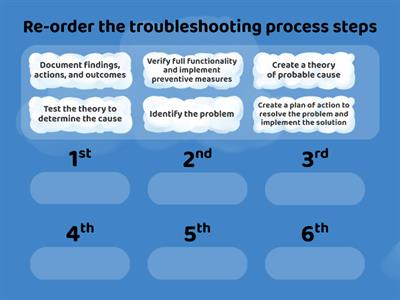
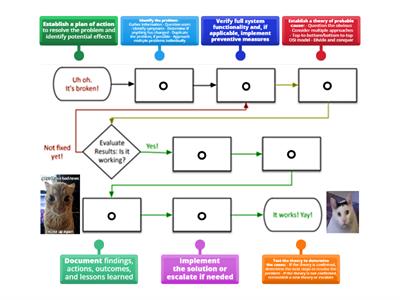
Identify the problem, Ask the user to describe the problem or symptoms, check for error messages, or recreate the problem., Identify what has changed, Establish what has changed. Most often, problems are caused by new hardware, software, or configuration changes. If necessary, ask users to recall what might have changed from the time the software worked and the time it didn't. Remember to inquire about environmental and infrastructure changes that could be relevant, Create hypothesis, With the information gathered in the preceding steps, conduct research and then develop several hypotheses that could potentially explain the problem. From your research and the information you have already gathered, narrow your hypotheses down to the one or two mostly likely causes., Determine the appropriate fix, Review knowledge bases, other websites, and your own experience to identify steps to remedy the problem. Before implementing any steps, think through all possible ramifications that might occur from the planned fixes. Often, the fix itself creates side effects that are just as bad or worse than the original issue, Implement the fix, It's finally time to implement the steps of the fix you have planned. Resist the urge to jump into troubleshooting by starting with this step., Verify functionality, After implementing the fix, verify that the fix repaired the problem. If the problem still exists or a new problem appears, start back at step one again., Document the solution, It might be tempting to move on to other problems, but be sure to document the previous six steps. This will save a lot of time and effort if the problem happens again in say a year or two.
0%
Troubleshooting Process
共有
共有
Alara42
さんの投稿です
Secondary
Computing
コンテンツの編集
セーブ
いいね!
印刷
埋め込み
もっと見る
割り当て
リーダーボード
もっと表示する
表示を少なくする
このリーダーボードは現在非公開です。公開するには
共有
をクリックしてください。
このリーダーボードは、リソースの所有者によって無効にされています。
このリーダーボードは、あなたのオプションがリソースオーナーと異なるため、無効になっています。
オプションを元に戻す
マッチアップ
は自由形式のテンプレートです。リーダーボード用のスコアは生成されません。
ログインが必要です
表示スタイル
フォント
サブスクリプションが必要です
オプション
もっとこんな感じだ
What would you do problem solving
Kferrante
さんの投稿です
クイズ
37
Troubleshooting advance computing system steps
Nahidabughname
さんの投稿です
マッチアップ
5
Troubleshooting process steps
Lubnaalmeshaiei
さんの投稿です
順位
5
CompTIA Troubleshooting Methodology
Freemanc176
さんの投稿です
グループ仕分け
22
Problem solving
Annashastak
さんの投稿です
ランダムホイール
4
Problem solving
Todoaba
さんの投稿です
クイズ
6
Problem-solving
Ciaranmckeon
さんの投稿です
グループ仕分け
3
network+ troubleshooting methodology
Shreksnose
さんの投稿です
ラベル付きの図
7
テンプレートを切り替える
すべてを表示
オープン結果
リンクをコピー
QRコード
削除
自動保存:
を復元しますか?