A user says they cannot access the Internet. You want to quickly determine whether their computer can communicate with the default gateway at 192.168.1.1. Which command should you use?, arp, ipconfig, ping, hostname, A help desk technician needs to quickly view the IPv4 address, subnet mask, and default gateway currently assigned to a Windows computer. Which command should be used?, ping, ipconfig, tracert, nslookup, A computer received an IP address from DHCP, but you need additional information, including the MAC address, DHCP server, DNS servers, and lease information. Which command should you use?, pathping, dig, arp -a, ipconfig /all, A laptop was moved from one network to another. You want the computer to give up its currently assigned DHCP address before requesting a new one. Which command should you run?, ipconfig, ipconfig /release, hostname, nslookup, After releasing a computer's DHCP address, you need it to contact the DHCP server and request a new IP configuration. Which command should you use?, ipconfig /flushdns, ipconfig /renew, ipconfig /all, tracert, A website recently changed its IP address. One user's computer continues trying to connect to the old address because it has cached the previous DNS information. Which command should you use?, ipconfig /flushdns, nslookup, hostname, tracert, Users can access most websites, but connections to a remote company server are failing. You want to see each router or hop that packets cross on their way to the destination. Which command should you use?, tracert, ipconfig /all, dig, nslookup, A user reports that they cannot access www.example.com. You suspect a DNS problem and want to determine what IP address the DNS server returns for the hostname. Which command should you use?, nslookup, hostname, dig, ipconfig /flushdns, You suspect a workstation has unexpected network connections. You want to view the computer's active TCP connections and listening ports. Which command should you use?, arp -a, netstat, pathping, ping, Two devices appear to be having communication problems on the local network. You want to view the workstation's ARP cache to see the IP-to-MAC address mappings it has learned. Which command should you use?, arp -a, ipconfig /flushdns, nslookup, hostname
0%
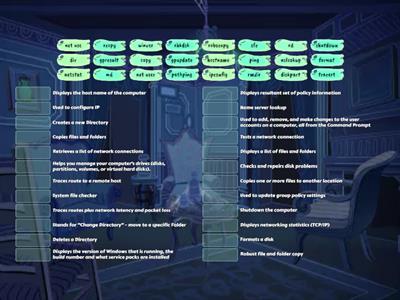
Networking Command Matching
공유
공유
만든이
Kkjoyner1
콘텐츠 편집
저장
좋아요
인쇄
퍼가기
더보기
로그인이 필요합니다
비주얼 스타일
모두 표시
글꼴
활동 설정
순위표
할당
구독 필요
활동 설정
순위표
이 순위표는 현재 비공개입니다.
공유
를 클릭하여 공개할 수 있습니다.
자료 소유자가 이 순위표를 비활성화했습니다.
옵션이 자료 소유자와 다르기 때문에 이 순위표가 비활성화됩니다.
옵션 되돌리기
더 보기
접기
퀴즈
(은)는 개방형 템플릿입니다. 순위표에 올라가는 점수를 산출하지 않습니다.
할당
아직 학생들과 공유한 액티비티가 없습니다.
결과 수집을 시작하려면 활동 페이지로 이동하여
할당 설정을
선택합니다.
설정을 확인하고 결과 링크를 학생들과 공유합니다.
과제 설정
이런 식으로 더 많아
CompTIA A+ Simulation - IP Address
만든이
Phagens
매치업
63
CompTIA A+ TCP/IP Tools
만든이
Kberg46
일치하는 것 찾기
98
Network+ Obj 5.3 Troubleshooting Issues
만든이
Kberg46
매치업
31
CompTIA a+ 1002 linux commands
만든이
Zqjkhlkckjub
매치업
34
CompTIA A+ 1102 Linux Command-line Tools
만든이
Ddlz8790
매치업
45
CompTIA A+ 1102 Windows Command-line Tools
만든이
Ddlz8790
매치업
39
Windows Commands - Comptia A+ 1102
만든이
Jesus38383
매치업
96
Linux Commands - CompTIA A+ 1102
만든이
Jesus38383
매치업
55
템플릿 전환하기
모두 표시
결과 열기
링크 복사
QR 코드
삭제
자동 저장된
게임을 복구할까요?