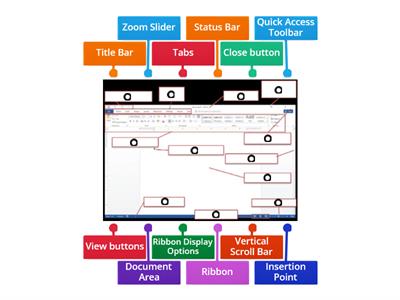
Word processing is the creation, editing, storage, and printing of a document using a word processor., TRUE, FALSE, A word processor is a computer application designed for manipulating text., FALSE, TRUE, The Ribbon contains all the commands you can use to work on a Word document., FALSE, TRUE, The Quick Access Toolbar cannot be customized., FALSE, TRUE, The Title Bar is located at the top of the program window., FALSE, TRUE, The Scroll Bars help you view parts of the document beyond what the window displays., TRUE, FALSE, The Zoom Slider changes the zooming level of the document., TRUE, FALSE, The Word Count indicator shows the current page number., TRUE, FALSE, You can add commands to the Quick Access Toolbar., FALSE, TRUE, You can remove a command from the Quick Access Toolbar by right-clicking it and choosing Remove from Quick Access Toolbar., TRUE, FALSE, What is word processing?, Playing computer games, Browsing the internet, Creating, editing, storing, and printing documents, Creating pictures, What computer application is designed for manipulating text?, Media player, Web browser, Calculator, Word processor, Which part of the Word window contains all the commands used to work on a document?, Zoom Slider, Scroll Bar, Ribbon, Title Bar, Which feature displays the Save, Undo, and Redo buttons?, Ribbon, Title Bar, Quick Access Toolbar, Navigation Pane, What feature helps you go to a particular spot in a document using headings, page thumbnails, or search results?, Scroll Bar, Zoom Slider, Navigation Pane, Ruler, What does the Zoom Slider do?, Opens the Navigation Pane, Counts the words, Saves the document, Changes the zooming level, Where is the Title Bar located?, On the left side, At the bottom of the window, At the top of the program window, Inside the document, What do the Scroll Bars help you do?, Add commands, Change the font, Count words, Scroll vertically or horizontally through a document, Which option can you select to add commands through the Quick Access Toolbar settings?, Page Number, Word Count, Auto-hide Ribbon, More Commands, What should you click to remove a command from the Quick Access Toolbar?, Show Tab and Commands, Add to Quick Access Toolbar, More Commands, Remove from Quick Access Toolbar, Which Microsoft Word feature displays the name of the active document?, Status Bar, Scroll Bar, Ribbon, Title Bar, Which Microsoft Word feature contains all the commands you can use to work on a document?, Quick Access Toolbar, Ribbon, Title Bar, Zoom Slider, Which Microsoft Word feature displays the Save, Undo, and Redo buttons?, Ribbon, Navigation Pane, Quick Access Toolbar, Status Bar, Which Microsoft Word feature changes the zoom level for viewing the document?, Zoom Slider, Title Bar, Ruler, Word Count, Which Microsoft Word feature shows the number of words in the document?, Word Count, Page View, Navigation Pane, Status Bar
0%
computer 4
공유
공유
만든이
Iamrecaroque
콘텐츠 편집
저장
좋아요
인쇄
퍼가기
더보기
할당
순위표
더 보기
접기
이 순위표는 현재 비공개입니다.
공유
를 클릭하여 공개할 수 있습니다.
자료 소유자가 이 순위표를 비활성화했습니다.
옵션이 자료 소유자와 다르기 때문에 이 순위표가 비활성화됩니다.
옵션 되돌리기
퀴즈
(은)는 개방형 템플릿입니다. 순위표에 올라가는 점수를 산출하지 않습니다.
로그인이 필요합니다
비주얼 스타일
글꼴
구독 필요
옵션
이런 식으로 더 많아
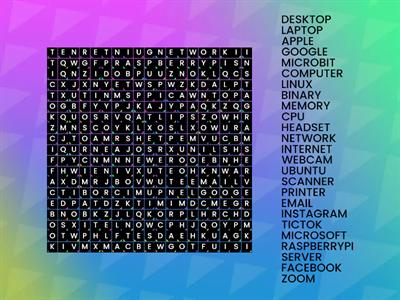
Computer Word Search
만든이
Sneekylinuxa1
워드서치
4
8.4 Review Drag a Word
만든이
Gretchen10
그룹 정렬
21
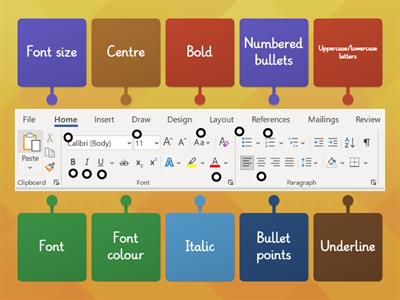
Microsoft Word toolbar
만든이
Fltutor
명칭이 있는 다이어그램
33
Quiz Basic Microsoft Word
만든이
G05325628
퀴즈
14
Microsoft Word Window Review
만든이
U71034113
명칭이 있는 다이어그램
10
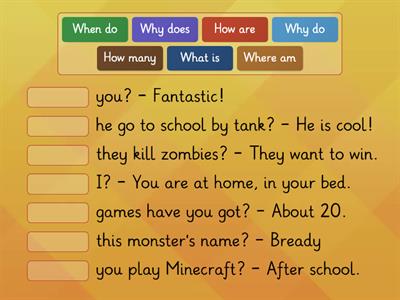
Questions WORDS KB 4
만든이
Altigrinova
매치업
7
Name the Tool Bar - Word Processing
만든이
Oliviawhite3
명칭이 있는 다이어그램
7
Word Processing Commands
만든이
Mrsreilly
명칭이 있는 다이어그램
62
AI 강화: 이 활동에는 AI가 생성한 콘텐츠가 포함되어 있습니다.
더 알아보세요.
템플릿 전환하기
모두 표시
결과 열기
링크 복사
QR 코드
삭제
자동 저장된
게임을 복구할까요?