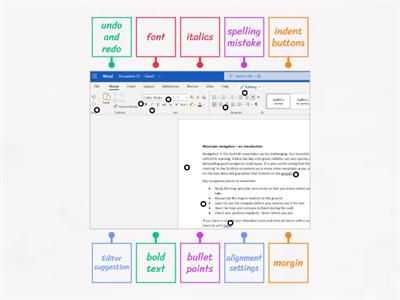
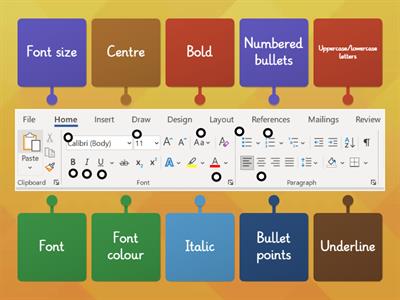
Which command will change the font?, 1, 2, 3, 4, 5, 6, Which icon will change the color of the text?, 1, 2, 3, 4, 5, 6, Which icon is used to underline text?, 1, 2, 3, 4, 5, 6, Which icon will change the size of the font?, 1, 2, 3, 4, 5, 6, Which icon is used to italicize text?, 1, 2, 3, 4, 5, 6, Which icon is used to bold text?, 1, 2, 3, 4, 5, 6, Which menu is used to download a file as a PDF?, File, Edit, View, Insert, Format, Tools, Which menu is used to change the page settings of a document?, File, Edit, View, Insert, Format, Tools, Which menu is used to change the line spacing of a document?, File, Edit, View, Insert, Format, Tools, Which menu is used to add headers and footers to a document?, File, Edit, View, Insert, Format, Tools, Which menu is used to add a comment to a document?, File, Edit, View, Insert, Format, Tools, Which menu would you choose to put an image into your document?, File, Edit, View, Insert, Format, Tools, What button is used to collaborate with others?, Add, Collaborate, Edit, Share, What is the name of number 1?, Docs Home, Formatting Toolbar, Menu, Title, What is the name of number 2?, Docs Home, Formatting Toolbar, Menu, Title, What is the name of number 3?, Docs Home, Formatting Toolbar, Menu, Title, What is the name of number 4?, Docs Home, Formatting Toolbar, Menu, Title, What is the FIRST thing you do when you open a Google Doc?, Add a header, Type your name, Title it, Change the margins, How do you copy text?, Ctrl + X, Ctrl + C, Ctrl + V, Ctrl + Z, Ctrl + Y, How do you paste text?, Ctrl + X, Ctrl + C, Ctrl + V, Ctrl + Z, Ctrl + Y, How do you cut text?, Ctrl + X, Ctrl + C, Ctrl + V, Ctrl + Z, Ctrl + Y, Your Google Doc always saves automatically., True, False
0%
Google Docs
공유
공유
만든이
Peytonpocock
Middle
CS
Human–Computer Interaction
콘텐츠 편집
저장
좋아요
인쇄
퍼가기
더보기
로그인이 필요합니다
비주얼 스타일
모두 표시
글꼴
활동 설정
순위표
할당
구독 필요
활동 설정
순위표
이 순위표는 현재 비공개입니다.
공유
를 클릭하여 공개할 수 있습니다.
자료 소유자가 이 순위표를 비활성화했습니다.
옵션이 자료 소유자와 다르기 때문에 이 순위표가 비활성화됩니다.
옵션 되돌리기
더 보기
접기
게임쇼 퀴즈
(은)는 개방형 템플릿입니다. 순위표에 올라가는 점수를 산출하지 않습니다.
할당
아직 학생들과 공유한 액티비티가 없습니다.
결과 수집을 시작하려면 활동 페이지로 이동하여
할당 설정을
선택합니다.
설정을 확인하고 결과 링크를 학생들과 공유합니다.
과제 설정
이런 식으로 더 많아
Google Docs' Features
만든이
Cristobal4
두더지잡기
3
Label the Parts of the Google Docs Interface
만든이
Cristobal4
명칭이 있는 다이어그램
17
Gr.3 Microsoft Word Review
만든이
D1513
상자 열기
3
Microsoft Word Basics
만든이
Alawhda
매치업
15
Microsoft Word (Home tab)
만든이
K22cld
명칭이 있는 다이어그램
30
Google Docs Interface
만든이
Ccomeau
명칭이 있는 다이어그램
5
Word Processing Commands
만든이
Mrsreilly
명칭이 있는 다이어그램
67
Google Docs Shortcuts Toolbar Diagram
만든이
Saralovel73
명칭이 있는 다이어그램
4
템플릿 전환하기
모두 표시
결과 열기
링크 복사
QR 코드
삭제
자동 저장된
게임을 복구할까요?