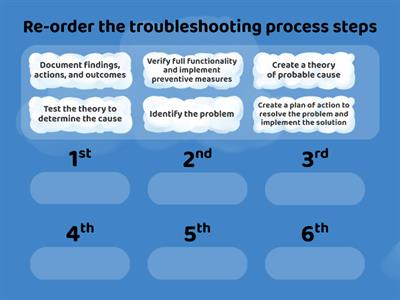
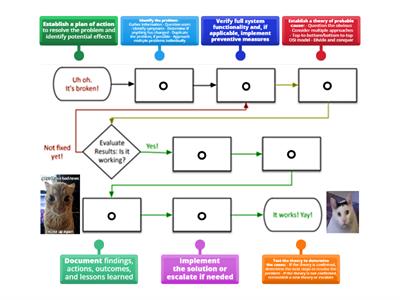
Identify the problem, Ask the user to describe the problem or symptoms, check for error messages, or recreate the problem., Identify what has changed, Establish what has changed. Most often, problems are caused by new hardware, software, or configuration changes. If necessary, ask users to recall what might have changed from the time the software worked and the time it didn't. Remember to inquire about environmental and infrastructure changes that could be relevant, Create hypothesis, With the information gathered in the preceding steps, conduct research and then develop several hypotheses that could potentially explain the problem. From your research and the information you have already gathered, narrow your hypotheses down to the one or two mostly likely causes., Determine the appropriate fix, Review knowledge bases, other websites, and your own experience to identify steps to remedy the problem. Before implementing any steps, think through all possible ramifications that might occur from the planned fixes. Often, the fix itself creates side effects that are just as bad or worse than the original issue, Implement the fix, It's finally time to implement the steps of the fix you have planned. Resist the urge to jump into troubleshooting by starting with this step., Verify functionality, After implementing the fix, verify that the fix repaired the problem. If the problem still exists or a new problem appears, start back at step one again., Document the solution, It might be tempting to move on to other problems, but be sure to document the previous six steps. This will save a lot of time and effort if the problem happens again in say a year or two.
0%
Troubleshooting Process
Kongsikan
Kongsikan
oleh
Alara42
Secondary
Computing
Edit Kandungan
Simpan
Sukai
Cetakan
Benamkan
Lebih lagi
Tugasan
Papan mata
Paparkan banyak
Paparkan sedikit
Papan mata ini berciri peribadi pada masa ini. Klik
Kongsikan
untuk menjadikannya umum.
Papan mata ini telah dilumpuhkan oleh pemilik sumber.
Papan mata ini dinyahdayakan kerana pilihan anda berbeza daripada pemilik sumber.
Pilihan untuk Kembali
Padankan
ialah templat terbuka. Ia tidak menjana skor untuk papan mata.
Log masuk diperlukan
Gaya visual
Fon
Langganan diperlukan
Pilihan
Lebih tepat seperti ini
What would you do problem solving
oleh
Kferrante
Kuiz
37
Troubleshooting advance computing system steps
oleh
Nahidabughname
Padankan
5
Troubleshooting process steps
oleh
Lubnaalmeshaiei
Susunan keutamaan
5
CompTIA Troubleshooting Methodology
oleh
Freemanc176
Susunan kumpulan
22
Problem solving
oleh
Annashastak
Roda rawak
4
Problem solving
oleh
Todoaba
Kuiz
6
Problem-solving
oleh
Ciaranmckeon
Susunan kumpulan
3
network+ troubleshooting methodology
oleh
Shreksnose
Gambar rajah berlabel
7
Tukar templat
Paparkan semua
Buka keputusan
Salin pautan
Kod QR
Padam
Pulihkan autosimpan:
?