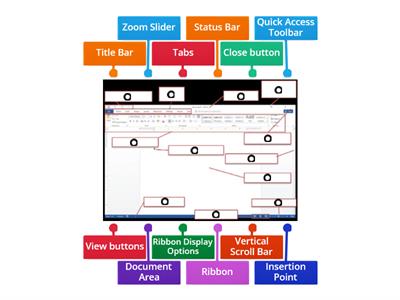
Word processing is the creation, editing, storage, and printing of a document using a word processor., TRUE, FALSE, A word processor is a computer application designed for manipulating text., FALSE, TRUE, The Ribbon contains all the commands you can use to work on a Word document., FALSE, TRUE, The Quick Access Toolbar cannot be customized., FALSE, TRUE, The Title Bar is located at the top of the program window., FALSE, TRUE, The Scroll Bars help you view parts of the document beyond what the window displays., TRUE, FALSE, The Zoom Slider changes the zooming level of the document., TRUE, FALSE, The Word Count indicator shows the current page number., TRUE, FALSE, You can add commands to the Quick Access Toolbar., FALSE, TRUE, You can remove a command from the Quick Access Toolbar by right-clicking it and choosing Remove from Quick Access Toolbar., TRUE, FALSE, What is word processing?, Playing computer games, Browsing the internet, Creating, editing, storing, and printing documents, Creating pictures, What computer application is designed for manipulating text?, Media player, Web browser, Calculator, Word processor, Which part of the Word window contains all the commands used to work on a document?, Zoom Slider, Scroll Bar, Ribbon, Title Bar, Which feature displays the Save, Undo, and Redo buttons?, Ribbon, Title Bar, Quick Access Toolbar, Navigation Pane, What feature helps you go to a particular spot in a document using headings, page thumbnails, or search results?, Scroll Bar, Zoom Slider, Navigation Pane, Ruler, What does the Zoom Slider do?, Opens the Navigation Pane, Counts the words, Saves the document, Changes the zooming level, Where is the Title Bar located?, On the left side, At the bottom of the window, At the top of the program window, Inside the document, What do the Scroll Bars help you do?, Add commands, Change the font, Count words, Scroll vertically or horizontally through a document, Which option can you select to add commands through the Quick Access Toolbar settings?, Page Number, Word Count, Auto-hide Ribbon, More Commands, What should you click to remove a command from the Quick Access Toolbar?, Show Tab and Commands, Add to Quick Access Toolbar, More Commands, Remove from Quick Access Toolbar, Which Microsoft Word feature displays the name of the active document?, Status Bar, Scroll Bar, Ribbon, Title Bar, Which Microsoft Word feature contains all the commands you can use to work on a document?, Quick Access Toolbar, Ribbon, Title Bar, Zoom Slider, Which Microsoft Word feature displays the Save, Undo, and Redo buttons?, Ribbon, Navigation Pane, Quick Access Toolbar, Status Bar, Which Microsoft Word feature changes the zoom level for viewing the document?, Zoom Slider, Title Bar, Ruler, Word Count, Which Microsoft Word feature shows the number of words in the document?, Word Count, Page View, Navigation Pane, Status Bar
0%
computer 4
Partajează
Partajează
de
Iamrecaroque
Editează conținutul
Salvează
Apreciază
Imprimare
Încorporează
Mai multe
Misiuni
Clasament
Arată mai mult
Arată mai puțin
Acest clasament este în prezent privat. Fă clic pe
Distribuie
pentru a-l face public.
Acest clasament a fost dezactivat de proprietarul resursei.
Acest clasament este dezactivat, deoarece opțiunile tale sunt diferite de ale proprietarului resursei.
Opțiuni de revenire
Chestionar
este un șablon deschis. Nu generează scoruri pentru un clasament.
Este necesară conectarea
Stilul vizual
Fonturi
Este necesar un abonament
Opţiuni
Mai degrabă așa
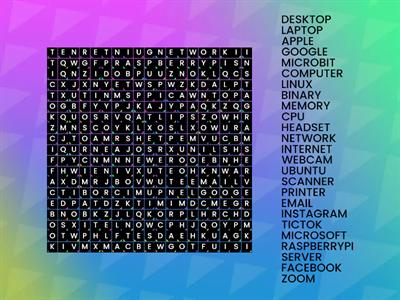
Computer Word Search
de
Sneekylinuxa1
Căutare de cuvânte
4
8.4 Review Drag a Word
de
Gretchen10
Sortare în funcție de grup
21
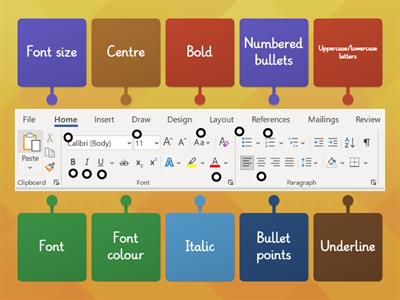
Microsoft Word toolbar
de
Fltutor
Diagramă etichetată
33
Quiz Basic Microsoft Word
de
G05325628
Chestionar
14
Microsoft Word Window Review
de
U71034113
Diagramă etichetată
10
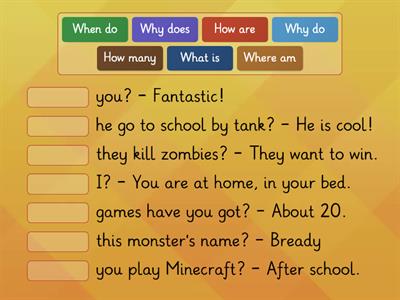
Questions WORDS KB 4
de
Altigrinova
Potrivește
7
Name the Tool Bar - Word Processing
de
Oliviawhite3
Diagramă etichetată
7
Word Processing Commands
de
Mrsreilly
Diagramă etichetată
62
AI Îmbunătățit: Această activitate conține conținut generat de AI.
Află mai multe.
Comutare șablon
Arată tot
Rezultate deschise
Copiați linkul
Cod QR
Şterge
Restaurare activitate salvată automat:
?