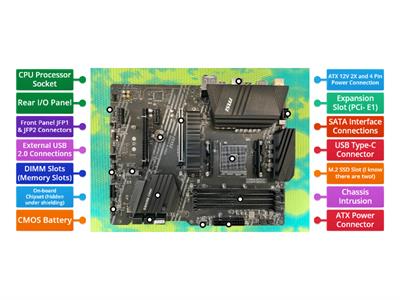
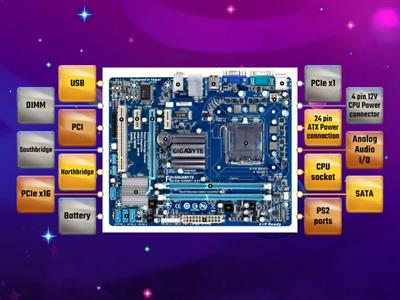
First, gather all the computer parts, Place the motherboard inside the case, Install the CPU onto the motherboard, Attach the CPU cooler securely, Insert the RAM into the slots, Mount the power supply carefully, Connect storage drives to the motherboard, Install the graphics card in place, Plug in all power cables, Turn on the computer and test
0%
Assembling a Computer
共享
共享
由
Sancha5
JHS
ICT
编辑内容
保存
喜欢
打印
嵌入
更多
需要登录
视觉风格
显示所有
字体
活动设置
排行榜
作业
需要订阅
活动设置
排行榜
此排行榜当前是私人享有。单击
,共享
使其公开。
资源所有者已禁用此排行榜。
此排行榜被禁用,因为您的选择与资源所有者不同。
还原选项
显示更多
显示更少
句子排列
是一个开放式模板。它不会为排行榜生成分数。
作业
您尚未与学生分享任何活动。
要开始收集结果,请转到任何活动页面,然后选择
Set assignment(设置分配
)。
确认您的设置并与学生共享生成的链接。
设置作业
更像是这样
Computer Motherboard
由
Neil5
标记图表
39
устройства компьютера
由
Ignatova
按组分配
8
Steps to start a computer
由
Steve14
排序练习
3
Устройства компьютера
由
Sova8383
刺破气球
4
The computer parts
由
Mmemebasiony
迷宫追逐
4
Устройство компьютера
由
29leskoff25
配对游戏
5
Motherboard Components
由
Ccomeau
标记图表
7
Computer Motherboard Components Quiz
由
Dcarter10
标记图表
3
AI增强版:本活动包含AI生成的内容。
了解更多信息。
切换模板
显示所有
打开成绩
复制链接
QR 代码
删除
恢复自动保存:
?