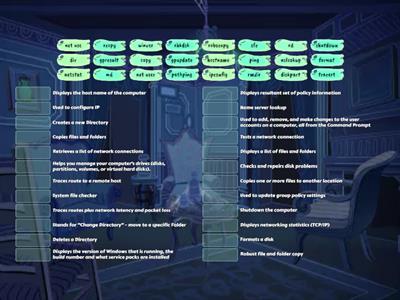
A user says they cannot access the Internet. You want to quickly determine whether their computer can communicate with the default gateway at 192.168.1.1. Which command should you use?, arp, ipconfig, ping, hostname, A help desk technician needs to quickly view the IPv4 address, subnet mask, and default gateway currently assigned to a Windows computer. Which command should be used?, ping, ipconfig, tracert, nslookup, A computer received an IP address from DHCP, but you need additional information, including the MAC address, DHCP server, DNS servers, and lease information. Which command should you use?, pathping, dig, arp -a, ipconfig /all, A laptop was moved from one network to another. You want the computer to give up its currently assigned DHCP address before requesting a new one. Which command should you run?, ipconfig, ipconfig /release, hostname, nslookup, After releasing a computer's DHCP address, you need it to contact the DHCP server and request a new IP configuration. Which command should you use?, ipconfig /flushdns, ipconfig /renew, ipconfig /all, tracert, A website recently changed its IP address. One user's computer continues trying to connect to the old address because it has cached the previous DNS information. Which command should you use?, ipconfig /flushdns, nslookup, hostname, tracert, Users can access most websites, but connections to a remote company server are failing. You want to see each router or hop that packets cross on their way to the destination. Which command should you use?, tracert, ipconfig /all, dig, nslookup, A user reports that they cannot access www.example.com. You suspect a DNS problem and want to determine what IP address the DNS server returns for the hostname. Which command should you use?, nslookup, hostname, dig, ipconfig /flushdns, You suspect a workstation has unexpected network connections. You want to view the computer's active TCP connections and listening ports. Which command should you use?, arp -a, netstat, pathping, ping, Two devices appear to be having communication problems on the local network. You want to view the workstation's ARP cache to see the IP-to-MAC address mappings it has learned. Which command should you use?, arp -a, ipconfig /flushdns, nslookup, hostname
0%
Networking Command Matching
共享
共享
由
Kkjoyner1
编辑内容
保存
喜欢
打印
嵌入
更多
需要登录
视觉风格
显示所有
字体
活动设置
排行榜
作业
需要订阅
活动设置
排行榜
此排行榜当前是私人享有。单击
,共享
使其公开。
资源所有者已禁用此排行榜。
此排行榜被禁用,因为您的选择与资源所有者不同。
还原选项
显示更多
显示更少
随堂测验
是一个开放式模板。它不会为排行榜生成分数。
作业
您尚未与学生分享任何活动。
要开始收集结果,请转到任何活动页面,然后选择
Set assignment(设置分配
)。
确认您的设置并与学生共享生成的链接。
设置作业
更像是这样
CompTIA A+ Simulation - IP Address
由
Phagens
匹配游戏
63
CompTIA A+ TCP/IP Tools
由
Kberg46
寻找匹配项
98
Network+ Obj 5.3 Troubleshooting Issues
由
Kberg46
匹配游戏
31
CompTIA a+ 1002 linux commands
由
Zqjkhlkckjub
匹配游戏
34
CompTIA A+ 1102 Linux Command-line Tools
由
Ddlz8790
匹配游戏
45
CompTIA A+ 1102 Windows Command-line Tools
由
Ddlz8790
匹配游戏
39
Windows Commands - Comptia A+ 1102
由
Jesus38383
匹配游戏
96
Linux Commands - CompTIA A+ 1102
由
Jesus38383
匹配游戏
55
切换模板
显示所有
打开成绩
复制链接
QR 代码
删除
恢复自动保存:
?