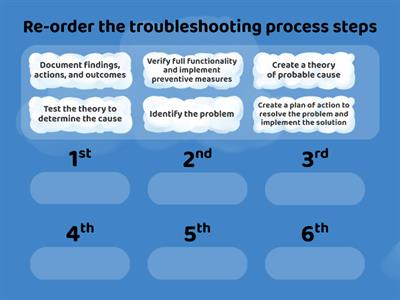
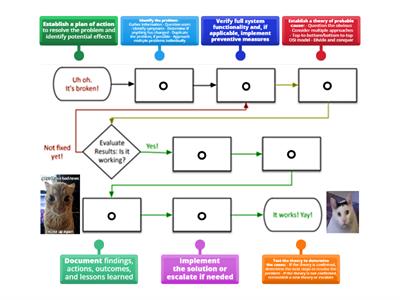
Identify the problem, Ask the user to describe the problem or symptoms, check for error messages, or recreate the problem., Identify what has changed, Establish what has changed. Most often, problems are caused by new hardware, software, or configuration changes. If necessary, ask users to recall what might have changed from the time the software worked and the time it didn't. Remember to inquire about environmental and infrastructure changes that could be relevant, Create hypothesis, With the information gathered in the preceding steps, conduct research and then develop several hypotheses that could potentially explain the problem. From your research and the information you have already gathered, narrow your hypotheses down to the one or two mostly likely causes., Determine the appropriate fix, Review knowledge bases, other websites, and your own experience to identify steps to remedy the problem. Before implementing any steps, think through all possible ramifications that might occur from the planned fixes. Often, the fix itself creates side effects that are just as bad or worse than the original issue, Implement the fix, It's finally time to implement the steps of the fix you have planned. Resist the urge to jump into troubleshooting by starting with this step., Verify functionality, After implementing the fix, verify that the fix repaired the problem. If the problem still exists or a new problem appears, start back at step one again., Document the solution, It might be tempting to move on to other problems, but be sure to document the previous six steps. This will save a lot of time and effort if the problem happens again in say a year or two.
0%
Troubleshooting Process
共享
共享
由
Alara42
Secondary
Computing
编辑内容
保存
喜欢
打印
嵌入
更多
作业
排行榜
显示更多
显示更少
此排行榜当前是私人享有。单击
,共享
使其公开。
资源所有者已禁用此排行榜。
此排行榜被禁用,因为您的选择与资源所有者不同。
还原选项
匹配游戏
是一个开放式模板。它不会为排行榜生成分数。
需要登录
视觉风格
字体
需要订阅
选项
更像是这样
What would you do problem solving
由
Kferrante
随堂测验
37
Troubleshooting advance computing system steps
由
Nahidabughname
匹配游戏
5
Troubleshooting process steps
由
Lubnaalmeshaiei
排序练习
5
CompTIA Troubleshooting Methodology
由
Freemanc176
按组分配
22
Problem solving
由
Annashastak
随机轮盘
4
Problem solving
由
Todoaba
随堂测验
6
Problem-solving
由
Ciaranmckeon
按组分配
3
network+ troubleshooting methodology
由
Shreksnose
标记图表
7
切换模板
显示所有
打开成绩
复制链接
QR 代码
删除
恢复自动保存:
?