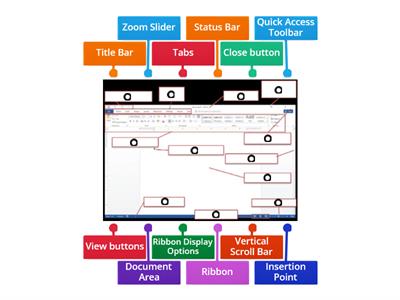
Word processing is the creation, editing, storage, and printing of a document using a word processor., TRUE, FALSE, A word processor is a computer application designed for manipulating text., FALSE, TRUE, The Ribbon contains all the commands you can use to work on a Word document., FALSE, TRUE, The Quick Access Toolbar cannot be customized., FALSE, TRUE, The Title Bar is located at the top of the program window., FALSE, TRUE, The Scroll Bars help you view parts of the document beyond what the window displays., TRUE, FALSE, The Zoom Slider changes the zooming level of the document., TRUE, FALSE, The Word Count indicator shows the current page number., TRUE, FALSE, You can add commands to the Quick Access Toolbar., FALSE, TRUE, You can remove a command from the Quick Access Toolbar by right-clicking it and choosing Remove from Quick Access Toolbar., TRUE, FALSE, What is word processing?, Playing computer games, Browsing the internet, Creating, editing, storing, and printing documents, Creating pictures, What computer application is designed for manipulating text?, Media player, Web browser, Calculator, Word processor, Which part of the Word window contains all the commands used to work on a document?, Zoom Slider, Scroll Bar, Ribbon, Title Bar, Which feature displays the Save, Undo, and Redo buttons?, Ribbon, Title Bar, Quick Access Toolbar, Navigation Pane, What feature helps you go to a particular spot in a document using headings, page thumbnails, or search results?, Scroll Bar, Zoom Slider, Navigation Pane, Ruler, What does the Zoom Slider do?, Opens the Navigation Pane, Counts the words, Saves the document, Changes the zooming level, Where is the Title Bar located?, On the left side, At the bottom of the window, At the top of the program window, Inside the document, What do the Scroll Bars help you do?, Add commands, Change the font, Count words, Scroll vertically or horizontally through a document, Which option can you select to add commands through the Quick Access Toolbar settings?, Page Number, Word Count, Auto-hide Ribbon, More Commands, What should you click to remove a command from the Quick Access Toolbar?, Show Tab and Commands, Add to Quick Access Toolbar, More Commands, Remove from Quick Access Toolbar, Which Microsoft Word feature displays the name of the active document?, Status Bar, Scroll Bar, Ribbon, Title Bar, Which Microsoft Word feature contains all the commands you can use to work on a document?, Quick Access Toolbar, Ribbon, Title Bar, Zoom Slider, Which Microsoft Word feature displays the Save, Undo, and Redo buttons?, Ribbon, Navigation Pane, Quick Access Toolbar, Status Bar, Which Microsoft Word feature changes the zoom level for viewing the document?, Zoom Slider, Title Bar, Ruler, Word Count, Which Microsoft Word feature shows the number of words in the document?, Word Count, Page View, Navigation Pane, Status Bar
0%
computer 4
Bendrinti
Bendrinti
prie
Iamrecaroque
Redaguoti turinį
Išsaugoti
Patinka
Spausdinti
Įterpti
Daugiau
Užduotis
Lyderių lentelė
Rodyti daugiau
Rodyti mažiau
Ši lyderių lentelė šiuo metu yra privati. Spustelėkite
Bendrinti
, kad ji būtų vieša.
Ši lyderių lentelė buvo išjungta išteklių savininko.
Ši lyderių lentelė yra išjungta, nes jūsų parinktys skiriasi nuo nustatytų išteklių savininko.
Grąžinti parinktis
Viktorina
yra neterminuotas šablonas. Jis negeneruoja rezultatų lyedrių lentelei.
Reikia prisijungti
Vizualinis stilius
Šriftai
Būtina prenumerata
Parinktys
Labiau taip.
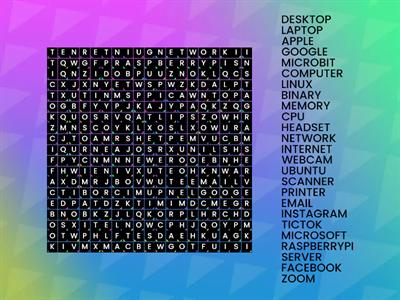
Computer Word Search
prie
Sneekylinuxa1
Žodžių paieška
4
8.4 Review Drag a Word
prie
Gretchen10
Priskyrimas grupėms
21
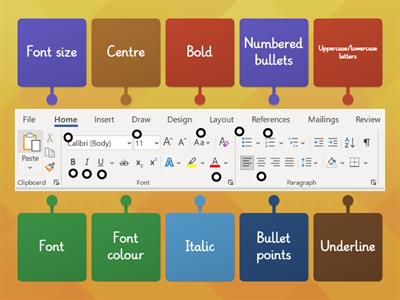
Microsoft Word toolbar
prie
Fltutor
Diagrama su kortelėmis
33
Quiz Basic Microsoft Word
prie
G05325628
Viktorina
14
Microsoft Word Window Review
prie
U71034113
Diagrama su kortelėmis
10
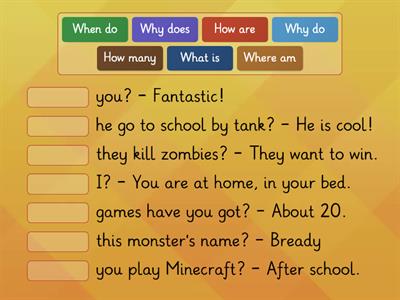
Questions WORDS KB 4
prie
Altigrinova
Rask tinkamą
7
Name the Tool Bar - Word Processing
prie
Oliviawhite3
Diagrama su kortelėmis
7
Word Processing Commands
prie
Mrsreilly
Diagrama su kortelėmis
62
Patobulintas dirbtinis intelektas: šioje veikloje yra dirbtinio intelekto sugeneruoto turinio.
Sužinoti daugiau, sužinok daugiau.
Pakeisti šabloną
Rodyti viską
Atviri rezultatai
Kopijuoti nuorodą
QR kodas
Naikinti
Atkurti automatiškai įrašytą:
?