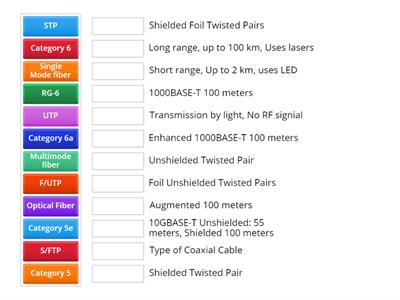
single mode, Used for long-distance transmissions, single mode fibers have a smaller core and support higher bandwidth with less signal attenuation., Multi mode, Suitable for shorter distances, multimode fibers have a larger core, which allows multiple light modes but can cause more signal dispersion and attenuation over longer distances., Category 5/6/7/8, Using a lower category cable (e.g., Cat5) instead of a higher category (e.g., Cat6, Cat7, or Cat8) can limit data transfer speeds and lead to increased errors, Shielded twisted pair (STP) vs Unshielded twisted pair (UTP), Using UTP cables in environments with high electromagnetic interference (EMI) instead of STP can result in signal degradation on and data corruption., Signal degradation, signal diminishes over distance or due to interference, crosstalk, specific type of signal degradation where a signal transmitted on one cable or channel interferes with a signal on another cable or channel., interference, disruption of signal transmission caused by electromagnetic signals from other electronic devices or cables., Attenuation, gradual loss of signal strength as it travels through a cable or medium., Improper termination, occurs when network cables are not correctly terminated with the appropriate connectors or techniques., Transmitter (tx)/receiver (rx) transposed, happens when the transmitter and receiver wires are incorrectly connected, causing communication failures., Increasing interface counters, Interface counters track various metrics related to network traffic and errors. Increasing counters indicate potential issues that need to be addressed to maintain optimal network performance, Cyclic redundancy check (CRC), occur when there is a mismatch in the data checksum, indicating data corruption during transmission., Runts, packets that are smaller than the minimum allowed size (usually less than 64 bytes)., Giants, packets that exceed the maximum allowed size (usually greater than 1518 bytes for Ethernet frames)., Drops, occur when packets are discarded due to congestion, bu er overflow, or configuration issues.
0%
5.2 Troubleshoot cabling/interface
Share
Share
by
Gprimal
Network plus
N10-009
Comptia
Edit Content
Save
Like
Print
Embed
More
Assignments
Leaderboard
Show more
Show less
This leaderboard is currently private. Click
Share
to make it public.
This leaderboard has been disabled by the resource owner.
This leaderboard is disabled as your options are different to the resource owner.
Revert Options
Match up
is an open-ended template. It does not generate scores for a leaderboard.
Log in required
Visual style
Fonts
Subscription required
Options
More like this
Network+ Obj 2.1 Cross-over and Straight-through Cables
by
Kberg46
Group sort
20
Network+ Obj 2.1 Cable Standards
by
Kberg46
Match up
17
Network+ Obj 5.3 Troubleshooting Issues
by
Kberg46
Match up
31
Network cables
by
Mhayesgw
Match up
30
Kiwi's Copy of Ethenet / Coaxial Cable and Fiber Standards Comptia A+ 1101
by
Kiwimynted
Match up
84
CompTIA 1101 USB Speeds
by
Deptmagic
Match up
16
Comptia A+ 1101 3.1 Network Cables
by
Rivera9898
Match up
30
Network+ N10-008 - Routing Technologies 2.2
by
I3igwolf
Match up
13
Switch template
Show all
Open results
Copy link
QR code
Delete
Continue editing:
?